Every app I've worked on has a handful of jobs that run on a schedule: the nightly database backup, the invoice run, the cleanup that deletes expired sessions, the sync with a partner's system. They're all invisible when they work, and just as invisible when they don't.
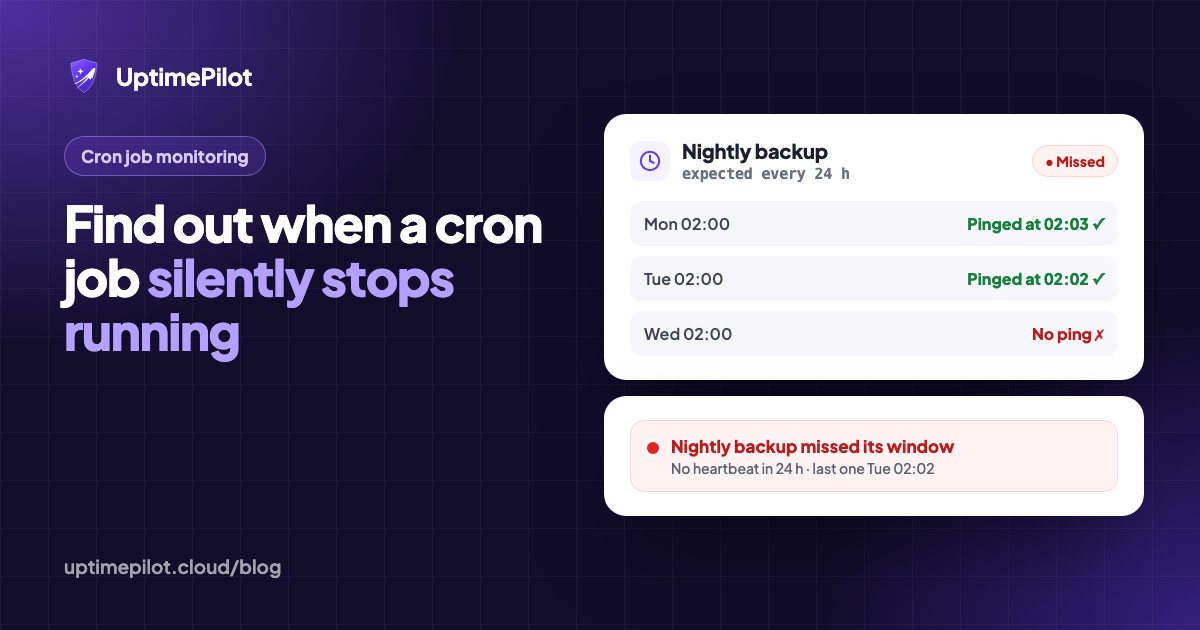
A backup job that stopped running three weeks ago doesn't throw an error anywhere you'll look. You find out on the day you need the backup. That's the failure I'm most afraid of, so every important scheduled job I have is watched by a heartbeat monitor in UptimePilot.
Why normal monitoring can't see this
Website and API monitors go out and check something. A cron job has nothing to check from the outside; there's no URL that says “the backup ran”. And the common ways jobs fail are all silent:
- The server was rebuilt and nobody copied the crontab over.
- The job hangs forever on a lock or a slow network call.
- It crashes early, and the error goes to a log file or a local mail spool no one reads.
- A deploy changed a path, and cron now runs a script that doesn't exist.
The fix is to flip it around: instead of us checking the job, the job checks in with us. If it stops checking in, something is wrong.
How heartbeat monitoring works
- You create a Cron heartbeat monitor and tell it how often the job should run, like every 24 hours.
- UptimePilot gives you a unique URL like
https://api.uptimepilot.cloud/cron/cron_…. - Your job calls that URL when it finishes successfully.
- If a call doesn't arrive within the interval, the check is marked as missed. After your failure threshold, an incident opens and you get an alert saying the job missed its window.
When the job runs again and checks in, the incident resolves and you get a recovery message.
Adding the heartbeat to your job
The monitor page gives you a ready-made curl command to copy. In a crontab, I chain it after the job with &&, so it only pings when the job succeeds:
# m h dom mon dow  command
        0 2 * * *  /opt/scripts/backup.sh && curl -fsS -m 10 --retry 3 -X POST https://api.uptimepilot.cloud/cron/<your-token>
The flags matter: -fsS keeps it quiet unless something's wrong, -m 10 stops a hung request from hanging your job, and --retry 3 survives a brief network blip. Inside a script, the same thing at the very end works just as well:
// Node.js, at the end of the job
        await fetch(process.env.BACKUP_HEARTBEAT_URL, { method: "POST" });
The endpoint accepts GET or POST, so any language or job runner that can make an HTTP request will do. Keep the URL in an environment variable or secret, since anyone who has it can check in for that job.
Picking the right interval
The interval is the only setting, so give it a little slack. A check-in is missed when nothing arrives within the interval of the previous one, so for a job that runs every 15 minutes I set 20 minutes, and for an hourly job about 70. A run that starts a few minutes late then doesn't count as a miss.
Each missed interval counts as one failed check, and the monitor's failure threshold decides how many it takes to open an incident. For frequent jobs I set the threshold to 1 or 2, so I hear about it within one or two runs instead of the default three.
Jobs worth a heartbeat
- Backups, always, and ideally after you've checked the backup file isn't empty.
- Billing and invoicing runs.
- Data syncs and imports with partners or third-party APIs.
- Queue workers or daemons: ping every few minutes from the main loop and you'll know when one dies.
- Certificate renewal jobs, as a second line of defence next to an SSL monitor.
Sleep better
Cron heartbeats are included on UptimePilot's Starter plan and above, from ₹499 a month (about $6) for 20 monitors, with alerts to email, Slack, Teams or Telegram. It's one line added to each crontab entry, and it turns the scariest kind of failure, the silent one, into a message on your phone. Start your free trial and add your first heartbeat when you upgrade.
Frequently asked questions
How does cron job monitoring work?
UptimePilot gives you a unique heartbeat URL. Your job calls it (GET or POST) every time it finishes. If no call arrives within the interval you set, the check counts as failed, and after your failure threshold an alert goes out.
What should the interval be?
A little longer than the gap between runs, so a job that starts a few minutes late doesn't count as a miss: 20 minutes for a job every 15 minutes, 70 minutes for an hourly job. The longest interval is 24 hours; for daily jobs, see the tip in the post.
Do I need to install an agent?
No. Any job that can make an HTTP request works: a curl line in crontab, a fetch at the end of a script, or a call from your job framework.
Which plan includes cron monitoring?
Cron heartbeats are included from Starter (₹499/month) and up.